Chapter 10: Credibility and Ethics
University of Minnesota
Learning Objectives
1. Identify appropriate methods for conducting college-level research.
2. Distinguish among various types of sources.
3. Evaluate the credibility of sources.
4. Identify various types of supporting material.
5. Employ visual aids that enhance a speaker’s message.
We live in an age where access to information is more convenient than ever before. The days of photocopying journal articles in the stacks of the library or looking up newspaper articles on microfilm are over for most. Yet, even though we have all this information at our fingertips, research skills are more important than ever. Our challenge now is not accessing information but discerning what information is credible and relevant. Even though it may sound inconvenient to have to physically go to the library, students who did research before the digital revolution did not have to worry as much about discerning. If you found a source in the library, you could be assured of its credibility because a librarian had subscribed to or purchased that content. When you use Internet resources like Google or Wikipedia, you have no guarantees about some of the content that comes up.
Finding Supporting Material
As was noted in “Selecting and Narrowing a Topic”, it’s good to speak about something you are already familiar with. So existing knowledge forms the first step of your research process. Depending on how familiar you are with a topic, you will need to do more or less background research before you actually start incorporating sources to support your speech. Background research is just a review of summaries available for your topic that helps refresh or create your knowledge about the subject. It is not the more focused and academic research that you will actually use to support and verbally cite in your speech. Figure 9.3 “Research Process” illustrates the research process. Note that you may go through some of these steps more than once.
Figure 9.3 Research Process
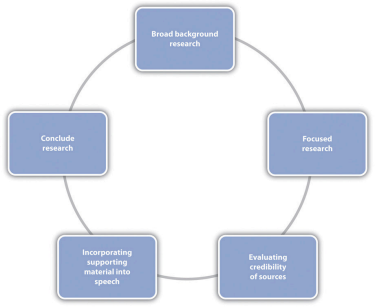
I will reiterate several times in this chapter that your first step for research in college should be library resources, not Google or Bing or other general search engines. In most cases, you can still do your library research from the comfort of a computer, which makes it as accessible as Google but gives you much better results. Excellent and underutilized resources at college and university libraries are reference librarians. Reference librarians are not like the people who likely staffed your high school library. They are information-retrieval experts. At most colleges and universities, you can find a reference librarian who has at least a master’s degree in library and information sciences, and at some larger or specialized schools, reference librarians have doctoral degrees. I liken research to a maze, and reference librarians can help you navigate the maze. There may be dead ends, but there’s always another way around to reach the end goal. Unfortunately, many students hit their first dead end and give up or assume that there’s not enough research out there to support their speech. Trust me, if you’ve thought of a topic to do your speech on, someone else has thought of it, too, and people have written and published about it. Reference librarians can help you find that information. I recommend that you meet with a reference librarian face-to-face and take your assignment sheet and topic idea with you. In most cases, students report that they came away with more information than they needed, which is good because you can then narrow that down to the best information. If you can’t meet with a reference librarian face-to-face, many schools now offer the option to do a live chat with a reference librarian, and you can also contact them by e-mail or phone.

College and university libraries are often at the cutting edge of information retrieval for academic research.
Andre Vandal – The Morrin College Library – CC BY-NC-ND 2.0.
Aside from the human resources available in the library, you can also use electronic resources such as library databases. Library databases help you access more credible and scholarly information than what you will find using general Internet searches. These databases are quite expensive, and you can’t access them as a regular citizen without paying for them. Luckily, some of your tuition dollars go to pay for subscriptions to these databases that you can then access as a student. Through these databases, you can access newspapers, magazines, journals, and books from around the world. Of course, libraries also house stores of physical resources like DVDs, books, academic journals, newspapers, and popular magazines. You can usually browse your library’s physical collection through an online catalog search. A trip to the library to browse is especially useful for books. Since most university libraries use the Library of Congress classification system, books are organized by topic. That means if you find a good book using the online catalog and go to the library to get it, you should take a moment to look around that book, because the other books in that area will be topically related. On many occasions, I have used this tip and gone to the library for one book but left with several.
Although Google is not usually the best first stop for conducting college-level research, Google Scholar is a separate search engine that narrows results down to scholarly materials. This version of Google has improved much over the past few years and has served as a good resource for my research, even for this book. A strength of Google Scholar is that you can easily search for and find articles that aren’t confined to a particular library database. Basically, the pool of resources you are searching is much larger than what you would have using a library database. The challenge is that you have no way of knowing if the articles that come up are available to you in full-text format. As noted earlier, most academic journal articles are found in databases that require users to pay subscription fees. So you are often only able to access the abstracts of articles or excerpts from books that come up in a Google Scholar search. You can use that information to check your library to see if the article is available in full-text format, but if it isn’t, you have to go back to the search results. When you access Google Scholar on a campus network that subscribes to academic databases, however, you can sometimes click through directly to full-text articles. Although this resource is still being improved, it may be a useful alternative or backup when other search strategies are leading to dead ends.
Types of Sources
There are several different types of sources that may be relevant for your speech topic. Those include periodicals, newspapers, books, reference tools, interviews, and websites. It is important that you know how to evaluate the credibility of each type of source material.
Periodicals
Periodicals include magazines and journals, as they are published periodically. There are many library databases that can access periodicals from around the world and from years past. A common database is Academic Search Premiere (a similar version is Academic Search Complete). Many databases, like this one, allow you to narrow your search terms, which can be very helpful as you try to find good sources that are relevant to your topic. You may start by typing a key word into the first box and searching. Sometimes a general search like this can yield thousands of results, which you obviously wouldn’t have time to look through. In this case you may limit your search to results that have your keyword in the abstract, which is the author-supplied summary of the source. If there are still too many results, you may limit your search to results that have your keyword in the title. At this point, you may have reduced those ten thousand results down to a handful, which is much more manageable.
Within your search results, you will need to distinguish between magazines and academic journals. In general, academic journals are considered more scholarly and credible than magazines because most of the content in them is peer reviewed. The peer-review process is the most rigorous form of review, which takes several months to years and ensures that the information that is published has been vetted and approved by numerous experts on the subject. Academic journals are usually affiliated with professional organizations rather than for-profit corporations, and neither authors nor editors are paid for their contributions. For example, the Quarterly Journal of Speech is one of the oldest journals in communication studies and is published by the National Communication Association.

The National Communication Association publishes several peer-reviewed academic journals.
The National Communication Association’s office in Washington D.C., courtesy of Wikimedia Commons – CC BY-SA 3.0.
If your instructor wants you to have sources from academic journals, you can often click a box to limit your search results to those that are “peer reviewed.” There are also subject-specific databases you can use to find periodicals. For example, Communication and Mass Media Complete is a database that includes articles from hundreds of journals related to communication studies. It may be acceptable for you to include magazine sources in your speech, but you should still consider the credibility of the source. Magazines like Scientific American and Time are generally more credible and reliable than sources like People or Entertainment Weekly.
Newspapers and Books
Newspapers and books can be excellent sources but must still be evaluated for relevance and credibility. Newspapers are good for topics that are developing quickly, as they are updated daily. While there are well known newspapers of record like the New York Times, smaller local papers can also be credible and relevant if your speech topic doesn’t have national or international reach. You can access local, national, and international newspapers through electronic databases like LexisNexis. If a search result comes up that doesn’t have a byline with an author’s name or an organization like the Associated Press or Reuters cited, then it might be an editorial. Editorials may also have bylines, which make them look like traditional newspaper articles even though they are opinion based. It is important to distinguish between news articles and editorials because editorials are usually not objective and do not go through the same review process that a news story does before it’s published. It’s also important to know the background of your paper. Some newspapers are more tabloid focused or may be published by a specific interest group that has an agenda and biases. So it’s usually better to go with a newspaper that is recognized as the newspaper of record for a particular area.
Books are good for a variety of subjects and are useful for in-depth research that you can’t get as regularly from newspapers or magazines. Edited books with multiple chapters by different authors can be especially good to get a variety of perspectives on a topic.

Don’t assume that you can’t find a book relevant to a topic that is fairly recent, since books may be published within a year of a major event.
Wikimedia Commons – CC BY 2.0.
To evaluate the credibility of a book, you’ll want to know some things about the author. You can usually find this information at the front or back of the book. If an author is a credentialed and recognized expert in his or her area, the book will be more credible. But just because someone wrote a book on a subject doesn’t mean he or she is the most credible source. For example, a quick search online brings up many books related to public speaking that are written by people who have no formal training in communication or speech. While they may have public speaking experience that can help them get a book deal with a certain publisher, that alone wouldn’t qualify them to write a textbook, as textbook authors are expected to be credentialed experts—that is, people with experience and advanced training/degrees in their area. The publisher of a book can also be an indicator of credibility. Books published by university/academic presses (University of Chicago Press, Duke University Press) are considered more credible than books published by trade presses (Penguin, Random House), because they are often peer reviewed and they are not primarily profit driven.
Reference Tools
The transition to college-level research means turning more toward primary sources and away from general reference materials. Primary sources are written by people with firsthand experiences with an event or researchers/scholars who conducted original research. Unfortunately, many college students are reluctant to give up their reliance on reference tools like dictionaries and encyclopedias. While reference tools like dictionaries and encyclopedias are excellent for providing a speaker with a background on a topic, they should not be the foundation of your research unless they are academic and/or specialized.
Dictionaries are handy tools when we aren’t familiar with a particular word. However, citing a dictionary like Webster’s as a source in your speech is often unnecessary. I tell my students that Webster’s Dictionary is useful when you need to challenge a Scrabble word, but it isn’t the best source for college-level research. You will inevitably come upon a word that you don’t know while doing research. Most good authors define the terms they use within the content of their writing. In that case, it’s better to use the author’s definition than a dictionary definition. Also, citing a dictionary doesn’t show deep research skills; it only shows an understanding of alphabetical order. So ideally you would quote or paraphrase the author’s definition rather than turning to a general dictionary like Webster’s. If you must turn to a dictionary, I recommend an academic dictionary like The Oxford English Dictionary (OED), which is the most comprehensive dictionary in the English language, with more than twenty volumes. You can’t access the OED for free online, but most libraries pay for a subscription that you can access as a student or patron. While the OED is an academic dictionary, it is not specialized, and you may need a specialized dictionary when dealing with very specific or technical terms. The Dictionary of Business and Economics is an example of an academic and specialized dictionary.
Many students have relied on encyclopedias for research in high school, but most encyclopedias, like World Book, Encarta, or Britannica, are not primary sources. Instead, they are examples of secondary sources that aggregate, or compile, research done by others in a condensed summary. As I noted earlier, reference sources like encyclopedias are excellent resources to get you informed about the basics of a topic, but at the college level, primary sources are expected. Many encyclopedias are Internet based, which makes them convenient, but they are still not primary sources, and their credibility should be even more scrutinized.

Wikipedia’s open format also means it doesn’t generally meet the expectations for credible, scholarly research.
Wikipedia – CC BY-SA 3.0.
Wikipedia revolutionized how many people retrieve information and pioneered an open-publishing format that allowed a community of people to post, edit, and debate content. While this is an important contribution to society, Wikipedia is not considered a scholarly or credible source. Like other encyclopedias, Wikipedia should not be used in college-level research, because it is not a primary source. In addition, since its content can be posted and edited by anyone, we cannot be sure of the credibility of the content. Even though there are self-appointed “experts” who monitor and edit some of the information on Wikipedia, we cannot verify their credentials or the review process that information goes through before it’s posted. I’m not one of the college professors who completely dismisses Wikipedia, however. Wikipedia can be a great source for personal research, developing news stories, or trivia. Sometimes you can access primary sources through Wikipedia if you review the footnote citations included in an entry. Moving beyond Wikipedia, as with dictionaries, there are some encyclopedias that are better suited for college research. The Encyclopedia of Black America and the Encyclopedia of Disaster Relief are examples of specialized academic reference sources that will often include, in each entry, an author’s name and credentials and more primary source information.
Interviews
When conducting an interview for a speech, you should access a person who has expertise in or direct experience with your speech topic. If you follow the suggestions for choosing a topic that were mentioned earlier, you may already know something about your speech topic and may have connections to people who would be good interview subjects. Previous employers, internship supervisors, teachers, community leaders, or even relatives may be appropriate interviewees, given your topic. If you do not have a connection to someone you can interview, you can often find someone via the Internet who would be willing to answer some questions. Many informative and persuasive speech topics relate to current issues, and most current issues have organizations that represent their needs. For an informative speech on ageism or a persuasive speech on lowering the voting age, a quick Internet search for “youth rights” leads you to the webpage for the National Youth Rights Association. Like most organization web pages, you can click on the “Contact Us” link to get information for leaders in the organization. You could also connect to members of the group through Facebook and interview young people who are active in the organization.
Once you have identified a good interviewee, you will want to begin researching and preparing your questions. Open-ended questions cannot be answered with a “yes” or “no” and can provide descriptions and details that will add to your speech. Quotes and paraphrases from your interview can add a personal side to a topic or at least convey potentially complicated information in a more conversational and interpersonal way.

Even if you record an interview, take some handwritten notes and make regular eye contact with the interviewee to show that you are paying attention.
David Davies – Interviews – CC BY-SA 2.0.
Closed questions can be answered with one or two words and can provide a starting point to get to more detailed information if the interviewer has prepared follow-up questions. Unless the guidelines or occasion for your speech suggest otherwise, you should balance your interview data with the other sources in your speech. Don’t let your references to the interview take over your speech.
Tips for Conducting Interviews
1. Do preliminary research to answer basic questions. Many people and organizations have information available publicly. Don’t waste interview time asking questions like “What year did your organization start?” when you can find that on the website.
2. Plan questions ahead of time. Even if you know the person, treat it as a formal interview so you can be efficient.
3. Ask open-ended questions that can’t be answered with only a yes or no. Questions that begin with how and why are generally more open-ended than do and did questions. Make sure you have follow-up questions ready.
4. Use the interview to ask for the personal side of an issue that you may not be able to find in other resources. Personal narratives about experiences can resonate with an audience.
5. Make sure you are prepared. If interviewing in person, have paper, pens, and a recording device if you’re using one. Test your recording device ahead of time. If interviewing over the phone, make sure you have good service so you don’t drop the call and that you have enough battery power on your phone. When interviewing on the phone or via video chat, make sure distractions (e.g., barking dogs) are minimized.
6. Whether the interview is conducted face-to-face, over the phone, or via video (e.g., Skype), you must get permission to record. Recording can be useful, as it increases accuracy and the level of detail taken away from the interview. Most smartphones have free apps now that allow you to record face-to-face or phone conversations.
7. Whether you record or not, take written notes during the interview. Aside from writing the interviewee’s responses, you can also take note of follow-up questions that come to mind or notes on the nonverbal communication of the interviewee.
8. Mention ahead of time if you think you’ll have follow-up questions, so the interviewee can expect further contact.
9. Reflect and expand on your notes soon after the interview. It’s impossible to transcribe everything during the interview, but you will remember much of what you didn’t have time to write down and can add it in.
10. Follow up with a thank-you note. People are busy, and thanking them for their time and the information they provided will be appreciated.
Websites
We already know that utilizing library resources can help you automatically filter out content that may not be scholarly or credible, since the content in research databases is selected and restricted. However, some information may be better retrieved from websites. Even though both research databases and websites are electronic sources, there are two key differences between them that may impact their credibility. First, most of the content in research databases is or was printed but has been converted to digital formats for easier and broader access. In contrast, most of the content on websites has not been printed. Although not always the case, an exception to this is documents in PDF form found on web pages. You may want to do additional research or consult with your instructor to determine if that can count as a printed source. Second, most of the content on research databases has gone through editorial review, which means a professional editor or a peer editor has reviewed the material to make sure it is credible and worthy of publication. Most content on websites is not subjected to the same review process, as just about anyone with Internet access can self-publish information on a personal website, blog, wiki, or social media page. So what sort of information may be better retrieved from websites, and how can we evaluate the credibility of a website?
Most well-known organizations have official websites where they publish information related to their mission. If you know there is an organization related to your topic, you may want to see if they have an official website. It is almost always better to get information from an official website, because it is then more likely to be considered primary source information. Keep in mind, though, that organizations may have a bias or a political agenda that affects the information they put out. If you do get information from an official website, make sure to include that in your verbal citation to help establish your credibility. Official reports are also often best found on websites, as they rarely appear in their full form in periodicals, books, or newspapers. Government agencies, nonprofits, and other public service organizations often compose detailed and credible reports on a wide variety of topics.

The US Census Bureau’s official website is a great place to find current and credible statistics related to population numbers and demographic statistics.
U.S. Census Bureau – public domain.
A key way to evaluate the credibility of a website is to determine the site’s accountability. By accountability, I mean determining who is ultimately responsible for the content put out and whose interests the content meets. The more information that is included on a website, the better able you will be to determine its accountability. Ideally all or most of the following information would be included: organization/agency name, author’s name and contact information, date the information was posted or published, name and contact information for person in charge of web content (i.e., web editor or webmaster), and a link to information about the organization/agency/ business mission. While all this information doesn’t have to be present to warrant the use of the material, the less accountability information is available, the more you should scrutinize the information. You can also begin to judge the credibility of a website by its domain name. Some common domain names are .com, .net, .org, .edu, .mil, and .gov. For each type of domain, there are questions you may ask that will help you evaluate the site’s credibility. You can see a summary of these questions in the Table “Website Domain Names and Credibility”. Note that some domain names are marked as “restricted” and others aren’t. When a domain is restricted, .mil for example, a person or group wanting to register that domain name has to prove that their content is appropriate for the guidelines of the domain name. Essentially, this limits access to the information published on those domain names, which increases the overall credibility.
Table 10.2 Website Domain Names and Credibility
Domain Name | Purpose | Restricted? | Questions to Ask |
.com, .net | Commercial | No | Is the information posted for profit? Is the information posted influenced by advertisers? |
.org | Mostly noncommercial organizations | No | What is the mission of the organization? Who is responsible for the content? Is the information published to enhance public knowledge or to solicit donations? |
.edu | Higher education | Yes | Who published the information? (the institution or an administrator, faculty member, staff member, or student) |
.mil | US military | Yes | Most information on .mil sites will be credible, since it is not published for profit and only limited people have access to post information. |
.gov | US government | Yes | Most information on .gov sites will be credible, since it is not published for profit and only limited people have access to post information. |
Types of Supporting Material
There are several types of supporting material that you can pull from the sources you find during the research process to add to your speech. They include examples, explanations, statistics, analogies, testimony, and visual aids. You will want to have a balance of information, and you will want to include the material that is most relevant to your audience and is most likely to engage them. When determining relevance, utilize some of the strategies mentioned in the Choosing a Topic section. Thinking about who your audience is and what they know and would like to know will help you tailor your information. Also try to incorporate proxemic information, meaning information that is geographically relevant to your audience. For example, if delivering a speech about prison reform to an audience made up of Californians, citing statistics from North Carolina prisons would not be as proxemic as citing information from California prisons. The closer you can get the information to the audience, the better. I tell my students to make the information so relevant and proxemic that it is in our backyards, in the car with us on the way to school or work, and in the bed with us while we sleep.
Examples
An example is a cited case that is representative of a larger whole. Examples are especially beneficial when presenting information that an audience may not be familiar with. They are also useful for repackaging or reviewing information that has already been presented. Examples can be used in many different ways, so you should let your audience, purpose and thesis, and research materials guide your use. You may pull examples directly from your research materials, making sure to cite the source. The following is an example used in a speech about the negative effects of standardized testing: “Standardized testing makes many students anxious, and even ill. On March 14, 2002, the Sacramento Bee reported that some standardized tests now come with instructions indicating what teachers should do with a test booklet if a student throws up on it.” You may also cite examples from your personal experience, if appropriate: “I remember being sick to my stomach while waiting for my SAT to begin.”
You may also use hypothetical examples, which can be useful when you need to provide an example that is extraordinary or goes beyond most people’s direct experience. Capitalize on this opportunity by incorporating vivid description into the example that appeals to the audience’s senses. Always make sure to indicate when you are using a hypothetical example, as it would be unethical to present an example as real when it is not. Including the word imagine or something similar in the first sentence of the example can easily do this.
Whether real or hypothetical, examples used as supporting material can be brief or extended. Brief examples are usually one or two sentences, as you can see in the following hypothetical example: “Imagine that your child, little sister, or nephew has earned good grades for the past few years of elementary school, loves art class, and also plays on the soccer team. You hear the unmistakable sounds of crying when he or she comes home from school and you find out that art and soccer have been eliminated because students did not meet the federal guidelines for performance on standardized tests.” Brief examples are useful when the audience is already familiar with a concept or during a review. Extended examples, sometimes called illustrations, are several sentences long and can be effective in introductions or conclusions to get the audience’s attention or leave a lasting impression. It is important to think about relevance and time limits when considering using an extended illustration. Since most speeches are given within time constraints, you want to make sure the extended illustration is relevant to your speech purpose and thesis and that it doesn’t take up a disproportionate amount of the speech. If a brief example or series of brief examples would convey the same content and create the same tone as the extended example, I suggest you go with brevity.
Explanations
Explanations clarify ideas by providing information about what something is, why something is the way it is, or how something works or came to be. One of the most common types of explanation is a definition. Definitions do not have to come from the dictionary. Many times, authors will define concepts as they use them in their writing, which is a good alternative to a dictionary definition.

Since quoting a dictionary definition during a speech is difficult, it’s better to put a definition into your own words based on how it is defined in the original source in which it appeared.
Julian Bucknall – Dictionaries – CC BY-NC 2.0.
As you do your research, think about how much your audience likely knows about a given subject. You do not need to provide definitions when information is common knowledge. Anticipate audience confusion and define legal, medical, or other forms of jargon as well as slang and foreign words. Definitions like the following are also useful for words that we are familiar with but may not know specifics: “According to the 2011 book Prohibition: 13 Years That Changed America, what we now know as Prohibition started in 1920 with the passage of the Volstead Act and the ratification of the Eighteenth Amendment.” Keep in mind that repeating a definition verbatim from a dictionary often leads to fluency hiccups, because definitions are not written to be read aloud. It’s a good idea to put the definition into your own words (still remembering to cite the original source) to make it easier for you to deliver.
Other explanations focus on the “why” and “how” of a concept. Continuing to inform about Prohibition, a speaker could explain why the movement toward Prohibition began: “The Eighteenth Amendment to the Constitution gained support because of the strong political influence of the Anti-Saloon League.” The speaker could go on to explain how the Constitution is amended: “According to the same book, a proposed amendment to the Constitution needs three-fourths of all the states to approve it in order to be ratified.” We use explanations as verbal clarifications to support our claims in daily conversations, perhaps without even noticing it. Consciously incorporating clear explanations into your speech can help you achieve your speech goals.
Statistics
Statistics are numerical representations of information. They are very credible in our society, as evidenced by their frequent use by news agencies, government offices, politicians, and academics. As a speaker, you can capitalize on the power of statistics if you use them appropriately. Unfortunately, statistics are often misused by speakers who intentionally or unintentionally misconstrue the numbers to support their argument without examining the context from which the statistic emerged. All statistics are contextual, so plucking a number out of a news article or a research study and including it in your speech without taking the time to understand the statistic is unethical.
Although statistics are popular as supporting evidence, they can also be boring. There will inevitably be people in your audience who are not good at processing numbers. Even people who are good with numbers have difficulty processing through a series of statistics presented orally. Remember that we have to adapt our information to listeners who don’t have the luxury of pressing a pause or rewind button. For these reasons, it’s a good idea to avoid using too many statistics and to use startling examples when you do use them. Startling statistics should defy our expectations. When you give the audience a large number that they would expect to be smaller, or vice versa, you will be more likely to engage them, as the following example shows: “Did you know that 1.3 billion people in the world do not have access to electricity? That’s about 20 percent of the world’s population according to a 2009 study on the International Energy Agency’s official website.”
You should also repeat key statistics at least once for emphasis. In the previous example, the first time we hear the statistic 1.3 billion, we don’t have any context for the number. Translating that number into a percentage in the next sentence repeats the key statistic, which the audience now has context for, and repackages the information into a percentage, which some people may better understand. You should also round long numbers up or down to make them easier to speak. Make sure that rounding the number doesn’t distort its significance. Rounding 1,298,791,943 to 1.3 billion, for example, makes the statistic more manageable and doesn’t alter the basic meaning. It is also beneficial to translate numbers into something more concrete for visual or experiential learners by saying, for example, “That’s equal to the population of four Unites States of Americas.” While it may seem easy to throw some numbers in your speech to add to your credibility, it takes more work to make them impactful, memorable, and effective.
Tips for Using Statistics
1. Make sure you understand the context from which a statistic emerges.
2. Don’t overuse statistics.
3. Use startling statistics that defy the audience’s expectations.
4. Repeat key statistics at least once for emphasis.
5. Use a variety of numerical representations (whole numbers, percentages, ratios) to convey information.
6. Round long numbers to make them easier to speak.
7. Translate numbers into concrete ideas for more impact.
Analogies
Analogies involve a comparison of ideas, items, or circumstances. When you compare two things that actually exist, you are using a literal analogy—for example, “Germany and Sweden are both European countries that have had nationalized health care for decades.” Another type of literal comparison is a historical analogy. In Mary Fisher’s now famous 1992 speech to the Republican National Convention, she compared the silence of many US political leaders regarding the HIV/AIDS crisis to that of many European leaders in the years before the Holocaust.
My father has devoted much of his lifetime to guarding against another holocaust. He is part of the generation who heard Pastor Niemöller come out of the Nazi death camps to say, “They came after the Jews and I was not a Jew, so I did not protest. They came after the Trade Unionists, and I was not a Trade Unionist, so I did not protest. They came after the Roman Catholics, and I was not a Roman Catholic, so I did not protest. Then they came after me, and there was no one left to protest.” The lesson history teaches is this: If you believe you are safe, you are at risk.
A figurative analogy compares things that are not normally related, often relying on metaphor, simile, or other figurative language devices. In the following example, wind and revolution are compared: “Just as the wind brings changes in the weather, so does revolution bring change to countries.”
When you compare differences, you are highlighting contrast—for example, “Although the United States is often thought of as the most medically advanced country in the world, other Western countries with nationalized health care have lower infant mortality rates and higher life expectancies.” To use analogies effectively and ethically, you must choose ideas, items, or circumstances to compare that are similar enough to warrant the analogy. The more similar the two things you’re comparing, the stronger your support. If an entire speech on nationalized health care was based on comparing the United States and Sweden, then the analogy isn’t too strong, since Sweden has approximately the same population as the state of North Carolina. Using the analogy without noting this large difference would be misrepresenting your supporting material. You could disclose the discrepancy and use other forms of supporting evidence to show that despite the population difference the two countries are similar in other areas to strengthen your speech.
Testimony
Testimony is quoted information from people with direct knowledge about a subject or situation. Expert testimony is from people who are credentialed or recognized experts in a given subject. Lay testimony is often a recounting of a person’s experiences, which is more subjective. Both types of testimony are valuable as supporting material. We can see this in the testimonies of people in courtrooms and other types of hearings. Lawyers know that juries want to hear testimony from experts, eyewitnesses, and friends and family. Congressional hearings are similar.

Congressional hearings often draw on expert and lay testimony to provide a detailed understanding of an event or issue.
Wikimedia Commons – public domain.
When Toyota cars were malfunctioning and being recalled in 2010, mechanics and engineers were called to testify about the technical specifications of the car (expert testimony), and car drivers like the soccer mom who recounted the brakes on her Prius suddenly failing while she was driving her kids to practice were also called (lay testimony). When using testimony, make sure you indicate whether it is expert or lay by sharing with the audience the context of the quote. Share the credentials of experts (education background, job title, years of experience, etc.) to add to your credibility or give some personal context for the lay testimony (eyewitness, personal knowledge, etc.).
“Getting Competent”
Choosing the Right Supporting Material
As you sift through your research materials to find supporting material to incorporate into your speech, you will want to include a variety of information types. Choosing supporting material that is relevant to your audience will help make your speech more engaging. As was noted earlier, a speaker should consider the audience throughout the speech-making process. Imagine you were asked to deliver a speech about your college or university. To get some practice adapting supporting material to various audiences, provide an example of each type of supporting material that is tailored to the following specific audiences. Include an example, an explanation, a statistic, an analogy, some testimony, and a visual aid.
1. Incoming first-year students
2. Parents of incoming first-year students
3. Alumni of the college or university
4. Community members that live close to the school
Visual Aids
Visual aids help a speaker reinforce speech content visually, which helps amplify the speaker’s message. They can be used to present any of the types of supporting materials discussed previously. Speakers rely heavily on an audience’s ability to learn by listening, which may not always be successful if audience members are visual or experiential learners. Even if audience members are good listeners, information overload or external or internal noise can be barriers to a speaker achieving his or her speech goals. Therefore skillfully incorporating visual aids into a speech has many potential benefits:
• Helping your audience remember information because it is presented orally and visually
• Helping your audience understand information because it is made more digestible through diagrams, charts, and so on
• Helping your audience see something in action by demonstrating with an object, showing a video, and so on
• Engaging your audience by making your delivery more dynamic through demonstration, gesturing, and so on
There are several types of visual aids, and each has its strengths in terms of the type of information it lends itself to presenting. The types of visual aids we will discuss are objects; chalkboards, whiteboards, and flip charts; posters and handouts; pictures; diagrams; charts; graphs; videos; and presentation software. It’s important to remember that supporting materials presented on visual aids should be properly cited. We will discuss proper incorporation of supporting materials into a speech in Section 9.3 “Organizing”. While visual aids can help bring your supporting material to life, they can also add more opportunities for things to go wrong during your speech. Therefore we’ll discuss some tips for effective creation and delivery as we discuss the various types of visual aids.
Objects
Three-dimensional objects that represent an idea can be useful as a visual aid for a speech. They offer the audience a direct, concrete way to understand what you are saying. I often have my students do an introductory speech where they bring in three objects that represent their past, present, and future. Students have brought in a drawer from a chest that they were small enough to sleep in as a baby, a package of Ramen noodles to represent their life as a college student, and a stethoscope or other object to represent their career goals, among other things. Models also fall into this category, as they are scaled versions of objects that may be too big (the International Space Station) or too small (a molecule) to actually show to your audience.
Tips for Using Objects Effectively
1. Make sure your objects are large enough for the audience to see.
2. Do not pass objects around, as it will be distracting.
3. Hold your objects up long enough for the audience to see them.
4. Do not talk to your object, wiggle or wave it around, tap on it, or obstruct the audience’s view of your face with it.
5. Practice with your objects so your delivery will be fluent and there won’t be any surprises.
Chalkboards, Whiteboards, and Flip Charts
Chalkboards, whiteboards, and flip charts can be useful for interactive speeches. If you are polling the audience or brainstorming you can write down audience responses easily for everyone to see and for later reference. They can also be helpful for unexpected clarification. If audience members look confused, you can take a moment to expand on a point or concept using the board or flip chart. Since many people are uncomfortable writing on these things due to handwriting or spelling issues, it’s good to anticipate things that you may have to expand on and have prepared extra visual aids or slides that you can include if needed. You can also have audience members write things on boards or flip charts themselves, which helps get them engaged and takes some of the pressure off you as a speaker.
Posters and Handouts
Posters generally include text and graphics and often summarize an entire presentation or select main points. Posters are frequently used to present original research, as they can be broken down into the various steps to show how a process worked. Posters can be useful if you are going to have audience members circulating around the room before or after your presentation, so they can take the time to review the poster and ask questions. Posters are not often good visual aids during a speech, because it’s difficult to make the text and graphics large enough for a room full of people to adequately see. The best posters are those created using computer software and professionally printed on large laminated paper.

Printing/copying businesses are now good at helping produce professional-looking posters. Although they can be costly, they add to the speaker’s credibility.
University of Fraser Valley – UFV – Student Research Day – CC BY 2.0.
These professional posters come at a price, often costing between forty and sixty dollars. If you opt to make your own poster, take care to make it look professional. Use a computer and printer to print out your text; do not handwrite on a poster. Make sure anything you cut by hand has neat, uniform edges. You can then affix the text, photos, and any accent backing to the poster board. Double-sided tape works well for this, as it doesn’t leave humps like those left by rolled tape or the bubbles, smearing, or sticky mess left by glue.
Handouts can be a useful alternative to posters. Think of them as miniposters that audience members can reference and take with them. Audience members will likely appreciate a handout that is limited to one page, is neatly laid out, and includes the speaker’s contact information. It can be appropriate to give handouts to an audience before a long presentation where note taking is expected, complicated information is presented, or the audience will be tested on or have to respond to the information presented. In most regular speeches less than fifteen minutes long, it would not be wise to distribute handouts ahead of time, as they will distract the audience from the speaker. It’s better to distribute the handouts after your speech or at the end of the program if there are others speaking after you.
Pictures
Photographs, paintings, drawings, and sketches fall into the pictures category of visual aids. Pictures can be useful when you need to show an exact replication of what you’re speaking about. Pictures can also connect to your audience on a personal level, especially if they evoke audience emotions. Think about the use of pictures in television commercials asking for donations or sponsorships. Organizations like Save the Children and the American Society for the Prevention of Cruelty to Animals successfully use pictures of malnourished children or abused animals to pull at the heartstrings of viewers. A series of well-chosen and themed pictures can have a meaningful impact on an audience. Although some pictures can be effectively presented when printed out on standard 8 1/2″ x 11″ printer paper using a black and white printer, others will need to be enlarged and/or printed in color, which will cost some money. You can often avoid this by incorporating a picture into a PowerPoint presentation, as the picture will be projected large enough for people to see. We will discuss PowerPoint in more detail later.
Diagrams and Drawings
Diagrams are good for showing the inner workings of an object or pointing out the most important or relevant parts of something. Think about diagrams as blueprints that show the inside of something—for example, key bones in the human body in a speech about common skateboarding injuries. Diagrams are good alternatives to pictures when you only need to point out certain things that may be difficult to see in a photograph.

Wikimedia Commons – public domain.
You may even be able to draw a simple diagram yourself if you find it would be useful during your speech. Although not all maps are simple enough to be created by the speaker, many maps can be hand drawn during a speech or ahead of time to indicate different locations or patterns. While I would recommend that you anticipate this ahead of time so you can incorporate a more professional version of the diagram created with computer software or more precise drawing, drawing a diagram on an overhead projector, whiteboard, or smart board can be useful.
Charts and Tables
Charts and tables are useful for compiling and cross-referencing larger amounts of information. The combination of rows and columns allows you to create headers and then divide them up into units, categories, dates, and so on. Medical information is put into charts so that periods of recorded information, such as vital signs, can be updated and scanned by doctors and nurses. Charts and tables are also good for combining text and numbers, and they are easy to make with word processing software like Microsoft Word or spreadsheet software like Excel. Think of presenting your department’s budget and spending at the end of a business quarter. You could have headers in the columns with the various categories and itemized deductions in the rows ending with a final total for each column.

A pie chart is an alternative representation of textual and numerical data that offers audience members a visual representation of the relative proportions of a whole. In a pie chart, each piece of the pie corresponds to a percentage of the whole, and the size of the pie varies with the size of the percentage. As with other charts and tables, most office software programs now easily make pie charts.

Graphs
Graphs are representations that point out numerical relationships or trends and include line graphs and bar graphs. Line graphs are useful for showing trends over time. For example, you could track the rising cost of tuition for colleges and universities in a persuasive speech about the need for more merit-based financial aid.

Bar graphs are good for comparing amounts. In the same speech, you could compare the tuition of two-year institutions to that of four-year institutions. Graphs help make numerical data more digestible for your audience and allow you to convey an important numerical trend visually and quickly without having to go into lengthy explanations. Remember to always clearly label your x-axis and y-axis and to explain the basics of your graph to your audience before you go into the specific data. If you use a graph that was created by someone else, make sure it is large and clear enough for the audience to read and that you cite the original source.

National Center for Education Statistics.
Video
Video clips as visual aids can be powerful and engaging for an audience, but they can also be troublesome for speakers. Whether embedded in a PowerPoint presentation, accessed through YouTube, or played from a laptop or DVD player, video clips are notorious for tripping up speakers. They require more than one piece of electronics when they are hooked to a projector and speaker and sometimes also require an Internet connection. The more electronic connection points, the more chances for something to go wrong. Therefore it is very important to test your technology before your speech, have a backup method of delivery if possible, and be prepared to go on without the video if all else fails. Although sometimes tempting, you should not let the video take over your speech. I recommend that my students not have more than 10 percent of their speech be filled with video, meaning there should be no more than one minute of video in a ten-minute speech. Make sure your video is relevant and that it is cued to where it needs to be. One useful strategy for incorporating video is to play a video without audio and speak along with the video, acting as a narrator. This allows the speaker to have more control over the visual aid and to adapt it and make it more relevant to a specific topic and audience. Additionally, video editing software like Final Cut and iMovie are readily available to college students and relatively easy to use. Some simple editing to cut together various clips that are meaningful or adding an introductory title or transitions can go a long way toward making your video look professional.
Presentation Software
The prevalence of computers and projectors in most schools, offices, and other presentation facilities has made using computer-generated visual aids more convenient. PowerPoint is the most commonly used presentation software and has functionality ranging from the most simple text-based slide to complicated transitions, timing features, video/sound imbedding, and even functionality with audience response systems like Turning Point that allow data to be collected live from audience members and incorporated quickly into the slideshow. Despite the fact that most college students have viewed and created numerous PowerPoint presentations, I have still seen many poorly executed slideshows that detracted from the speaker’s message. PowerPoint should be viewed as a speech amplifier. Like an amplifier for a guitar, it doesn’t do much without a musician there to play the instrument. The speaker is the musician, the speech is the instrument, and PowerPoint is the amplifier. Just as the amplifier doesn’t dictate what the guitar player does, neither should PowerPoint take over the speaker.
I like to distinguish between using PowerPoint as a presentation aid and as a visual aid. PowerPoint, with all its bells and whistles, is designed as a presentation aid. Presentations are generally longer than speeches, at least fifteen minutes long, and are content heavy. College lectures and many professional conference presentations fall into this category. In these cases, PowerPoint generally runs along with the speaker throughout the presentation, reviewing key points and presenting visual aids such as pictures and graphs. The constant running of the slideshow also facilitates audience note taking, which is also common during presentations.
Speeches, on the other hand, are usually fifteen minutes or less, have repetition and redundancy built in (as they are adapted to a listening audience), and carry less expectation that the audience will take detailed notes. In this case, I believe PowerPoint should be used more as a visual aid, meaning that it should be simpler and amplify particular components of the speech rather than run along with the speaker throughout the speech.
Tips for Using PowerPoint as a Visual Aid
1. Do not have more than two slides per main point.
2. Use a consistent theme with limited variation in font style and font size.
3. Incorporate text and relevant graphics into each slide.
4. Limit content to no more than six lines of text or six bullet points per slide.
5. Do not use complete sentences; be concise.
6. Avoid unnecessary animation or distracting slide transitions.
7. Only have a slide displayed when it is relevant to what you’re discussing. Insert completely black slides to display when you are not explicitly referencing content in the speech so the audience doesn’t get distracted.
“Getting Plugged In”
Alternatives to PowerPoint
Although PowerPoint is the most frequently used presentation software, there are alternatives that can also be engaging and effective if the speaker is willing to invest the time in learning something new. Keynote is Apple’s alternative to Microsoft’s PowerPoint and offers some themes and style choices that can set your presentation apart from the familiar look of PowerPoint. Keep in mind that you will need to make sure you have access to Mac-compatible presentation tools, since Keynote won’t run or open on most PCs. Prezi is a new web-based presentation tool that uses Flash animation, zooming, and motion to make a very different-looking computer-generated visual aid. If you have the time to play with Prezi and create a visual aid for your presentation, you will stand out. You can see Prezi in action in Note 9.31 “Video Clip 9.1”. You can also see sample presentations on Prezi’s website: http://prezi.com/explore.
1. What are some positives and negatives of using PowerPoint as a visual aid?
2. What are some other alternatives to using PowerPoint as a visual aid? Why?
Video Clip 9.1
James Geary, Metaphorically Speaking
" href="http://youtube.com/watch?v=2cU56SWXHFw" class="replaced-iframe" data-url="http://youtube.com/ watch?v=2cU56SWXHFw">(click to see video)
In this video, James Geary presents on metaphor using Prezi as his visual aid.
Key Takeaways
• Library resources like databases and reference librarians are more suitable for college-level research than general search engines.
• Research sources include periodicals, newspapers and books, reference tools, interviews, and websites. The credibility of each type of supporting material should be evaluated.
• Speakers should include a variety of supporting material from their research sources in their speeches. The types of supporting material include examples, explanations, statistics, analogies, testimony, and visual aids.
• Visual aids help a speaker reinforce their content visually and have many potential benefits. Visual aids can also detract from a speech if not used properly. Visual aids include objects; chalkboards, whiteboards, and flip charts; posters and handouts; pictures; diagrams; charts; graphs; video; and presentation software.
Exercises
1. Getting integrated: Identify some ways that research skills are helpful in each of the following contexts: academic, professional, personal, and civic.
2. Go to the library webpage for your school. What are some resources that will be helpful for your research? Identify at least two library databases and at least one reference librarian. If you need help with research, what resources are available?
3. What are some websites that you think are credible for doing college-level research? Why? What are some website that are not credible? Why?
Ethically Using and Citing Sources

It’s helpful to understand why to cite your sources.
You likely know that research projects always need a list of references sometimes called a bibliography. But have you ever wondered why?
There are some big picture reasons that don’t often get articulated that might help you get better at meeting the citation needs of research projects. It’s helpful to understand both the theory behind citing, as well as the mechanics of it, to really become a pro.
This section introduces the concept of citing sources, so you can begin your search for sources with it in mind. See Steps for Citing for examples and the steps for citing appropriately.
In everyday life, we often have conversations where we share new insights with each other. Sometimes these are insights we’ve developed on our own through the course of our own everyday experiences, thinking, and reflection. Sometimes these insights come after talking to other people and learning from additional perspectives. When we relate the new things we have learned to our family, friends, or co-workers, we may or may not fill them in on how these thoughts came to us.
![A hand drawn political cartoon. A politician is giving a speech on stage, and a person in the crowd holds up a sign that says "[Citation Needed]"](https://lh5.googleusercontent.com/k9adtDAa9f7OSRm2C9YAS5tD3xu0LQ2ALwFxONGEScuEUrH3DSlf1Zk9ke27WqzjklkLXMqPvIfne4mMZE-mpFJ7l4CvyeYvYCVCaklTguDHurl1aNDlfMd4NkKKZngwbRsIY33QP-FgE13tCgLhR60 "Political Cartoon")
In everyday conversation and political speeches, evidence for arguments is often not provided. (Image source: XKDC)
Academic research leads us to the insight that comes from gaining perspectives and understandings from other people through what we read, watch, and hear. In academic work, we must tell our readers who and what led us to our conclusions. Documenting our research is important because people rely on academic research to be authoritative, so it is essential for academic conversations to be as clear as possible. Documentation for clarity is a shared and respected practice, and it represents a core value of the academy called “academic integrity.” It is a way to distinguish academic conversations from everyday conversations.
It is hard to talk about citation practices without considering some related concepts. Here are some definitions of those concepts that are often mentioned in assignments when citing sources is required.
What Is Academic Integrity?
Different universities have different definitions. Ohio State University uses this definition:
Academic integrity is a commitment, even in the face of adversity, to five fundamental values: honesty, trust, fairness, respect, and responsibility. From these values flow principles of behavior that enable academic communities to translate ideals into action.
Please take a few moments to read the University of Northern Iowa Student Academic Ethics Policy.
In other words, you must take full responsibility for your work, acknowledge your own efforts, and acknowledge the contributions of others’ efforts. Working with integrity requires accurately representing what you contributed, as well as acknowledging how others have influenced your work. When you are a student, an accurate representation of your knowledge is important because it will allow both you and your professors to know the extent to which you have developed as a scholar. Part of that development is evidenced by how you apply the rules for acknowledging the work of others.
What Is Academic Misconduct?
As you might imagine, academic misconduct is when you do not use integrity in your academic work. Academic misconduct includes many different unacceptable behaviors, but the one most relevant to what we are discussing here is submitting plagiarized work:
Submitting the published or unpublished work of another person as one’s own, including paraphrases or direct quotations, without full and clear acknowledgment such as adequate footnotes, quotations, and other reference forms
To see the full definition of plagiarism, refer to the Academic Ethics Violations section of the University of Northern Iowa Student Academic Ethics Policy. Plagiarism can be intentional (knowingly using someone else’s work and presenting it as your own) or unintentional (inaccurately or inadequately citing ideas and words from a source). It may be impossible for your professor to determine whether plagiarized work was intentional or unintentional. But in either case, plagiarism puts both you and your professor in a compromising position.
While academic integrity calls for work resulting from your own effort, scholarship requires that you learn from others. So in the world of academic scholarship, you are actually expected to learn new things from others AND come to new insights on your own. There is an implicit understanding that as a student you will be both using other’s knowledge as well as your own insights to create new scholarship. To do this in a way that meets academic integrity standards you must acknowledge the part of your work that develops from others’ efforts. You do this by citing the work of others. You plagiarize when you fail to acknowledge the work of others and do not follow appropriate citation guidelines.
What Is Citing?
Citing or citation is a practice of documenting specific influences on your academic work. See Steps for Citing for details.
In other words, you must cite all the sources you quote directly, paraphrase, or summarize as you:
• Answer your research question
• Convince your audience
• Describe the situation around your research question and why the question is important
• Report what others have said about your question
Why Cite Sources?
As a student citing is important because it shows your reader, in many cases your professor, that you have invested time in learning what has already been learned and thought about the topic before offering your own perspective. It is the practice of giving credit to the sources that inform your work.
Our definitions of academic integrity, academic misconduct, and plagiarism, also give us important reasons for citing the sources we use to accomplish academic research. Here are all the good reasons for citing.
To Avoid Plagiarism & Maintain Academic Integrity
Misrepresenting your academic achievements by not giving credit to others indicates a lack of academic integrity. This is not only looked down upon by the scholarly community but it is also punished. When you are a student this could mean a failing grade or even expulsion from the university.
To Acknowledge the Work of Others
One major purpose of citations is to simply provide credit where it is due. When you provide accurate citations, you are acknowledging both the hard work that has gone into producing research and the person(s) who performed that research.
Think about the effort you put into your work (whether essays, reports, or even non-academic jobs): if someone else took credit for your ideas or words, would that seem fair, or would you expect to have your efforts recognized?
To Provide Credibility to Your Work & to Place Your Work in Context
Providing accurate citations puts your work and ideas into an academic context. They tell your reader that you’ve done your research and know what others have said about your topic. Not only do citations provide context for your work but they also lend credibility and authority to your claims.
For example, if you’re researching and writing about sustainability and construction, you should cite experts in sustainability, construction, and sustainable construction in order to demonstrate that you are well-versed in the most common ideas in the fields. Although you can make a claim about sustainable construction after doing research only in that particular field, your claim will carry more weight if you can demonstrate that your claim can be supported by the research of experts in closely related fields as well.
Citing sources about sustainability and construction as well as sustainable construction demonstrates the diversity of views and approaches to the topic. In addition, proper citation also demonstrates the ways in which research is social: no one researches in a vacuum—we all rely on the work of others to help us during the research process.
To Help Your Future Researching Self & Other Researchers Easily Locate Sources
Having accurate citations will help you as a researcher and writer keep track of the sources and information you find so that you can easily find the source again. Accurate citations may take some effort to produce, but they will save you time in the long run. So think of proper citation as a gift to your future researching self!
When to Quote, Paraphrase, or Summarize

This section features advice for using sources well in your writing projects.
If your final product is a research paper, essay, or presentation much of your writing will be devoted to:
• Reporting what others have said about your research question.
• Describing the situation surrounding your research question for your audience and explaining why it’s important.
• Convincing your audience that your answer is correct or, at least, the most reasonable answer. Giving them evidence.
To accomplish this you will often paraphrase, summarize, or use direct quotes when appropriate. But how should you choose which technique to use when?
Tip: Citing Sources
Remember to cite your sources when quoting, paraphrasing, and summarizing. See How to Cite Sources for details.
Choose a direct quote

• when what you’re quoting is the text you’re analyzing
• when a direct quote is more accurate and concise than a summary
or paraphrase would be and conciseness matters
• when the author is a particular authority whose exact words would lend credence to your argument
• when the author has used particularly effective language that is just too good to pass up.
Choose to paraphrase or summarize rather than to quote directly
when the meaning is more important than the particular language the

author used and you don’t need to use the author’s preeminent
authority to bolster your argument at the moment.
Choose to paraphrase instead of summarizing when you need details
and specificity. Paraphrasing lets you emphasize the ideas in source materials that are most relevant to your research project instead of the exact language the author used. It also lets you simplify complex material, sometimes rewording to use language that is more understandable to your reader.
Choose to summarize instead of paraphrasing when you need to provide a brief overview of a larger text. Summaries let you condense the resource material to draw out particular points, omit unrelated or unimportant points, and simplify convey how the author’s message.

For more tips on paraphrasing and summarizing, including an example of how to do one of each we suggest visiting the Excelsior Owl Writing Lab. While you’re at this site, you’ll notice other helpful information available about the writing process.
Challenges in Citing Sources
Here are some challenges that might make knowing when and how to cite difficult for you. Our best advice for how to overcome these challenges is in the first item.
Running Out of Time
When you are a student taking many classes simultaneously and facing many deadlines, it may be hard to devote the time needed to do good scholarship and accurately representing the sources you have used. Research takes time. The sooner you can start and the more time you can devote to it, the better your work will be. From the beginning, be sure to include in your notes where you found the information you could quote, paraphrase, and summarize in your final product.
Having to Use Different Styles
Different disciplines require that your citations be in different styles: which publication information is included and in what order. So your citations for different courses could look different, particularly for courses outside your major.
Not Really Understanding the Material You’re Using
If you are working in a new field or subject area, you might have difficulty understanding the information from other scholars, thus making it difficult to know how to paraphrase or summarize that work properly.
Shifting Cultural Expectations of Citation
Because of new technologies that make finding, using, and sharing information easier, many of our cultural expectations around how to do that are changing as well. For example, blog posts often “reference” other articles or works by simply linking to them. It makes it easy for the reader to see where the author’s ideas have come from and to view the source very quickly. But in these more informal writings, blog authors do not have a list of citations. The links do the work for them. This is a great strategy for online digital mediums, but this method fails over time when links break and there are no hints (like an author, title, and date) to know how else to find the reference, which might have moved.
This example of cultural change of expectations in the non-academic world might make it seem that there has been a change in academic scholarship as well, or might make people new to academic scholarship even less familiar with citation. But in fact, the expectations around citing sources in academic research remain formal.
Citation and Citation Styles

Sources that influenced your thinking and
research must be cited in academic writing.
Citing sources is an academic convention for keeping track of which sources influenced your own thinking and research. See Ethical Use and Citing Sources for many good reasons why you should cite others’ work.
Most citations require two parts:
• The full bibliographic citation on the Bibliography, References or Works Cited page of your final product.
• An indication within your text that tells your reader where you have used something that needs a citation. In-text citations usually include the author and publication date and maybe the page number from which you are quoting.
With your in-text citation, your reader will be able to tell which full bibliographic citation you are referring to by paying attention to the author’s name and publication date.
Let’s look at an example.
Example: Citations in Academic Writing
Here’s a citation in APA style in the text of an academic paper:
Studies have shown that compared to passive learning, which occurs when students observe a lecture, students will learn more and will retain that learning longer if more active methods of teaching and learning are used (Bonwell & Eison 1991; Fink 2003).
The information in parentheses coordinates with a list of full citations at the end of the paper. At the end of the paper, these bibliographic entries appear in a reference list:
Bonwell, C.C., & Eison, J. A. (1991). Active learning: Creating excitement in the classroom (Report No. 1). ASHE-ERIC Higher Education. https://files.eric.ed.gov/fulltext/ ED336049.pdf
Fink, L. D. (2003). Creating significant learning experiences. Wiley.
Citation Styles
Style guides set the specific rules for how to create both in-text citations and their full bibliographic citations. There are over a dozen kinds of citation styles. While each style requires much of the same publication information to be included in a citation, the styles differ from each other in formatting details such as capitalization, punctuation, the order of publication information, and whether the author’s name is given in full or abbreviated.
Example: Differences in Citation Styles
Below are bibliographic citations for the same article in four common styles. Notice they contain information about who the author is, article title, journal title, publication year, and information about volume, issue, and pages. Notice the small difference in punctuation, order of the elements, and formatting that do make a difference.
APA:
Rosenhan, D. L. (1973). On being sane in insane places. Science, 179(4070), 250-258. https://doi.org/10.1126/science.179.4070.250
Chicago:
Rosenhan, D. L. 1973. “On Being Sane in Insane Places.” Science 179, no. 4070: 250-258. https://doi.org/10.1126/science.179.4070.250.
MLA:
Rosenhan, D. L. “On Being Sane in Insane Places.” Science, vol. 179, no. 4070: 250-258, 1973, https://doi.org/10.1126/science.179.4070.250.
AMA:
Rosenhan, DL. On being sane in insane places. Science.1973, 179(4070):250-258. doi:10.1126/ science.179.4070.250.
Compare citation elements including punctuation and spacing to see how each style handles each element.
|239
Citing Data (See also – Ethical use of Sources)
Unlike many other types of resources, data is not copyrightable, but the expression of data is. So as with any other information source, you should cite any data you use from a source, whether it appeared in an article or you downloaded the data from a repository on the Web.
Some data providers will have recommended citations on their web pages. Unfortunately, data citation standards do not exist in many disciplines, although the DataCite initiative is working on them. Current workarounds include:
• Citing a “data paper,” where available.
• Citing a journal article that describes the dataset.
• Citing a book that includes the data.
• Citing the dataset as a website, where possible.
Examples: Citing Data
Data from a research database:
• APA: Department of Agriculture (USDA). (2008). “Crops Harvested”, Crop Production [data file]. Data Planet, (09/15/2009).
• MLA: “Crops Harvested”, Department of Agriculture (USDA) [data file] (2008). Data Planet, (09/15/2009).
Data from a file found on the open Web:
• APA: Center for Health Statistics, Washington State Department of Health. (2012, November). Mortality Table D1. Age-Adjusted Rates for Leading Causes of Cancer for Residents, 2002-2011. [Microsoft Excel file]. Washington State Department of Health. Available from http://www.doh.wa.gov/
• MLA: Center for Health Statistics, Washington State Department of Health. Mortality Table D1. Age-Adjusted Rates for Leading Causes of Cancer for Residents, 2002-2011. Washington State Department of Health, Nov. 2012. Microsoft Excel file. Retrieved from http://www.doh.wa.gov/
Steps for Citing

To write a proper citation we recommend following these steps, which will help you maintain accuracy and clarity in acknowledging sources.
Step 1: Determine Your Citation Style
Find out the name of the citation style you must use from your instructor, the directions for an assignment, or what you know your audience or publisher expects. Then search for your style at the Excelsior Online Writing Lab (OWL) or use Rod Library's citation guide.
Step 2: Create In-Text Citations
Find and read your style’s rules about in-text citations, which are usually very thorough. Luckily, there are usually examples provided that make it a lot easier to learn the rules.
For instance, your style guide may have different rules for when you are citing:
◦ Quotations rather than summaries rather than paraphrases
◦ Long, as opposed to short, quotations.
◦ Sources with one or multiple authors.
◦ Books, journal articles, interviews, emails, or electronic sources.
Step 3: Determine the Kind of Source
After creating your in-text citation, now begin creating the full bibliographic citation that will appear on the References or Bibliography page by deciding what kind of source you have to cite (book, film, journal article, webpage, etc.).
Example: Using a Style Guide to Create an In-Text Citation
Imagine that you’re using APA style and have the APA style guide rules for in-text citations open in Excelsior OWL. In your geography paper, you want to quote from the book The Experience of Nature written by Rachel Kaplan and Stephen Kaplan and published in 1989. You want to quote a passage from page 38.
Here’s what you want to quote:
“The way space is organized provides information about what one might want to do in that space. A relatively brief glance at a scene communicates whether there is room to roam, whether one’s path is clear or blocked.”
1. Skim the headings in the style guide to remind yourself of the topics covered by its rules. Since it has rules about the length of quotations, you count the number of words in what you want to quote and find that your quote has 38, which is within the range for short quotations (less than 40), according to the APA style guide. According to the rule for short quotations, you see that you’re supposed to introduce the quote by attributing the quote to the author or authors (last name only) and adding the publication date in parentheses. You write:
According to the Kaplans (1989), “The way space is organized provides information about what one might want to do in that space. A relatively brief glance at a scene communicates whether there is room to roam, whether one’s path is clear or blocked.”
2. Then you notice that the example in the style guide includes the page number on which you found the quotation. It appears at the end of the quote (in parentheses and outside the quote marks but before the period ending the quotation). So you add that:
According to the Kaplans (1989), “The way space is organized provides information about what one might want to do in that space. A relatively brief glance at a scene communicates whether there is room to roam, whether one’s path is clear or blocked” (p. 38).
3. You’re feeling pretty good, but then you realize that you have overlooked the rule about having multiple authors. You have two and their last names are both Kaplan. So you change your sentence to:
According to Kaplan and Kaplan (1989), “The way space is organized provides information about what one might want to do in that space. A relatively brief glance at a scene communicates whether there is room to roam, whether one’s path is clear or blocked” (p.38).
So you have your first in-text citation for your final product:
According to Kaplan and Kaplan (1989), “The way space is organized provides information about what one might want to do in that space. A relatively brief glance at a scene communicates whether there is room to roam, whether one’s path is clear or blocked” (p.38).
Step 4: Study Your Style’s Rules for Bibliographic Citations
Next, you’ll need a full bibliographic citation for the same source. This citation will appear on the References page or Bibliography page or Works Cited page. APA style, which we’re using here, requires a page called References. Bibliographic citations usually contain more publication facts than you used for your in-text citation, and the formatting for all of them is very specific.
• Rules vary for sources, depending, for instance, on whether they are books, journal articles, or online sources.
• Sometimes lines of the citation must be indented.
• Authors’ names usually appear with the last name first.
• Authors’ first names of authors may be initials instead.
• Names of sources may or may not have to be in full.
• Names of some kinds of sources may have to be italicized.
• Names of some sources may have to be in quotes.
• Dates of publication appear in different places, depending on the style.
• Some styles require Digital Object Identifiers (DOIs ) in the citations for online sources.
Step 5: Identify Citation Elements
Figure out which bibliographic citation rules apply to the source you’ve just created an in-text citation for. Then apply them to create your first bibliographic citation.
Example: Using a Style Guide to Create a Bibliographic Citation
Imagine that you’re using APA style and have the APA style guide rules for bibliographic citations open in Excelsior OWL.
Your citation will be for the book called The Experience of Nature, written by Rachel Kaplan and Stephen Kaplan and published in 1989.
1. You start by trying to apply OWL’s basic rules of APA style, which tell you your citation will start with the last name of your author followed by their first initial, and that the second line of the citation will be indented. So you write: Kaplan, R. and Kaplan, S. and remind yourself to indent the second line when you get there.
2. Since you have two authors, you look for a rule regarding that situation, which requires a comma between the authors and an ampersand between the names. So you write: Kaplan, R., & Kaplan, S.
3. Because you know your source is a book, you look for style guide rules and examples about books. For instance, the rules for APA style say that the publication date goes in parentheses, followed by a period after the last author’s name. And that the title of the book is italicized. You apply the rules and examples and write the publication information you know about your source: Kaplan, R., & Kaplan, S. (1989). The Experience of Nature.
4. You look at the examples and learn in APA, the first word of a book title and any proper nouns are capitalized. You write: Kaplan, R., & Kaplan, S. (1989). The experience of nature.
5. Next, you look at the rules and examples of book citations and notice that they show the publisher of the book. So you find that information about your source (in a book, usually on the title page or its back) and write: Kaplan, R., & Kaplan, S. (1989). The Experience of Nature. Cambridge University Press.
Congratulations, especially about remembering to indent that line! You have created the first bibliographic citation for your final product.
Kaplan, R., & Kaplan, S. (1989). The Experience of Nature. Cambridge University Press.
Exercise: APA citations
Review these APA citations and identify the type of resource in the citation.
An interactive H5P element has been excluded from this version of the text. You can view it online here: https://minnstate.pressbooks.pub/ctar/?p=196#h5p-27
Step 6: Repeat the steps for creating an in-text citation and a bibliographic citation for each of your sources.
Create your bibliographic citation by arranging publication information to match the example you chose in Step 4. Pay particular attention to what is and is not capitalized and to what punctuation and spaces separate each part that the example illustrates.
Citation Management
You may be familiar with the many citation generators that allow you to auto-generate reference lists from citation data. Some allow you to save and store citations to reuse them in different lists and in a different work, as needed.
Such tools are worth investigating and learning about for any long-term research project. Zotero and Mendeley are online and available for free to anyone from anywhere. RefWorks and EndNote are fee-based services that some libraries subscribe to.
Good reasons to use a citation generator include:
• To save time: it takes citation generation software only a few seconds to create a citation.
• To easily convert citations from one style to another.
• To have a centralized source list that is not attached to a specific project, which allows you to reuse references and their citations in various projects.
Things to watch out for with citation generators:
• Citation generation software is only as good as the information entered into it. In other words, if you provide incorrect information or do not include some information, then your citation will be incorrect.
• Most citation generation software can create citations by searching for the information online. Sometimes software can pull the information from the wrong edition of a source, for example, or specific formatting (such as italics) might be lost. Or perhaps the generator didn’t use the latest version of the style guide.
• Always review the citations you create with this software.
When to Cite
Citing sources is often described as a straightforward, rule-based practice. But in fact, there are many gray areas around citation, and learning how to apply citation guidelines takes practice and education. If you are confused by it, you are not alone – in fact, you might be doing some good thinking. Here are some guidelines to help you navigate citation practices.
Cite when you are directly quoting. This is the easiest rule to understand. If you are stating word for-word what someone else has already written, you must put quotes around those words and you must give credit to the original author. Not doing so would mean that you are letting your reader believe these words are your own and represent your own effort.
Cite when you are summarizing and paraphrasing. This is a trickier area to understand. First of all, summarizing and paraphrasing are two related practices but they are not the same. Summarizing is when you read a text, consider the main points, and provide a shorter version of what you learned. Paraphrasing is when you restate what the original author said in your own words and in your own tone. Both summarizing and paraphrasing require good writing skills and an accurate understanding of the material you are trying to convey. Summarizing and paraphrasing are difficult to do when you are a beginning academic researcher, but these skills become easier to perform over time with practice.
Cite when you are citing something that is highly debatable. For example, if you want to claim that the PATRIOT Act has been an important tool for national security, you should be prepared to give examples of how it has helped and how experts have claimed that it has helped. Many U.S. citizens concerned that it violates privacy rights won’t agree with you, and they will be able to find commentary that the Patriot Act has been more harmful to the nation than helpful. You need to be prepared to show such skeptics that you have experts on your side, too.
When Not to Cite?
Don’t cite when what you are saying is your own insight. As you learned in previous chapters, research involves forming opinions and insights around what you learn. You may be citing several sources that have helped you learn, but at some point, you must integrate your own opinion, conclusion, or insight into the work. The fact that you are not citing it helps the reader understand that this portion of the work is your unique contribution developed through your own research efforts.
Don’t cite when you are stating common knowledge. What is common knowledge is sometimes difficult to discern. In general, quick facts like historical dates or events are not cited because they are common knowledge.
Examples of information that would not need to be cited include:
• The Declaration of Independence was signed in 1776.
• Barack Obama became the 44th president of the United States in January, 2009.
Some quick facts, such as statistics, are trickier. For example, the number of gun-related deaths per year probably should be cited, because there are a lot of ways this number could be determined (does the number include murder only, or suicides and accidents, as well?) and there might be different numbers provided by different organizations, each with an agenda about gun laws.
A guideline that can help with deciding whether or not to cite facts is to determine whether the same data is repeated in multiple sources. If it is not, it is best to cite.
The other thing that makes this determination difficult might be that what seems new and insightful to you might be common knowledge to an expert in the field. You have to use your best judgment, and probably err on the side of over-citing, as you are learning to do academic research. You can seek the advice of your instructor, a writing tutor, or a librarian. Knowing what is and is not common knowledge is a practiced skill that gets easier with time and with your own increased knowledge.
Tip: Why You Can’t Cite Wikipedia
You’ve likely been told at some point that you can’t cite Wikipedia, or any encyclopedia for that matter, in your scholarly work.
The reason is that such entries are meant to prepare you to do research, not be evidence of your having done it. Wikipedia entries, which are tertiary sources, are already a summary of what is known about the topic. Someone else has already done the labor of synthesizing lots of information into a concise and quick way of learning about the topic.

Wikipedia, while good for early research and background information, shouldn’t be cited as a source because it’s already a summary.
So while Wikipedia is a great shortcut for getting context, background, and a quick lesson on
topics that might not be familiar to you, don’t quote, paraphrase, or summarize from it. Just use it to educate yourself.